
Description
Subscriptions can be canceled for many reasons. By learning these reasons through surveys and responding with appropriate offers, you can turn a potential cancellation into a continued subscription.
Important links:
Premium Version Page | Demo for Plugin Testing | Plugin Documentation
Cancellation Survey and Offers for WooCommerce Subscriptions helps you keep more subscribers by addressing their concerns when they decide to cancel. This plugin lets you set up surveys to understand why customers are leaving and offers them discounts, or skip next renewal to encourage them to stay.
Features
- Customizable Feedback Forms: Create surveys to understand why customers want to stop their subscriptions.
- Conditional Multi-Offers: Create multiple different offers within a single survey and trigger specific discounts based on the customer’s specific cancellation reason.
- Ask for details: Specify certain cancellation reasons that require users to provide a detailed response.
- Extended text editor: Use the extended editor in survey descriptions to attach media, style your text, and more.
- Segmented Surveys: Make different surveys for various types of products and categories as well as user roles or accounts.
- Detailed Analytics: Track each cancellation attempt, cancellation reasons, and (in the premium version) the performance of retention offers in the survey dashboard.
- Numerous Hooks: Both survey and retention offer popups include multiple hooks for adding custom text, media, and more.
Premium Features
- Automated Retention Offers: Automatically offer retention incentives if certain survey answers are chosen.
- Targeted Logic: Link different survey answers to different offers (e.g., offer a “Price” respondent a 50% discount, while offering a “Moving away” respondent a “Skip Renewal” option).
- Offer discounts: Apply a discount to the user’s subscription when they accept a retention offer to keep their subscription.
- Offer to skip renewal: Allow users to postpone their next renewal by one subscription period instead of canceling.
- Inherits Coupon Code Capabilities: Plugin’s discount offers are based on coupon codes, so you can utilize all features of coupon codes to create discounts.
- Subscription Duration Limits: Limit on whom discounts are offered based on how long the subscription has been active.
- Retention offers for trials: Exclude users still in their free trial from receiving retention offers.
The plugin works with WooCommerce’s recurring coupon codes to offer discounts when someone tries to cancel their subscription. It includes all the features of recurring coupon codes, such as fixed amount off, percentage off, or discounts for a set number of renewals. Additionally, since the discount system is based on regular WooCommerce coupons, you can enhance your discount strategies by integrating with other plugins that enhance coupon codes (like Smart Coupons). This combination gives you greater control over your discount offers, making it easier to tailor them to specific subscription scenarios.
How to use
- Create cancellation survey – Design and deploy surveys to understand why customers might cancel their subscriptions. These surveys can be tailored to specific subscriber segments and product types.
- Add multiple retention offers – Create one or more offers (discounts or skip renewal) within your survey. You can now map specific survey answers to specific offers, allowing for a highly personalized retention strategy.
- Set limits to users, subscriptions, and products – Set restrictions to control who can receive retention offers and under what conditions. Set parameters based on user roles, subscription duration, and product categories.
- Test surveys and offers – Make a test purchase and attempt to cancel. Verify that different survey answers trigger the correct corresponding offers as configured.
- Track retention success in dashboard – Go to Survey Answers in the Surveys & Offers tab to view analytics on which specific offers are performing best for specific cancellation reasons.
Screenshots
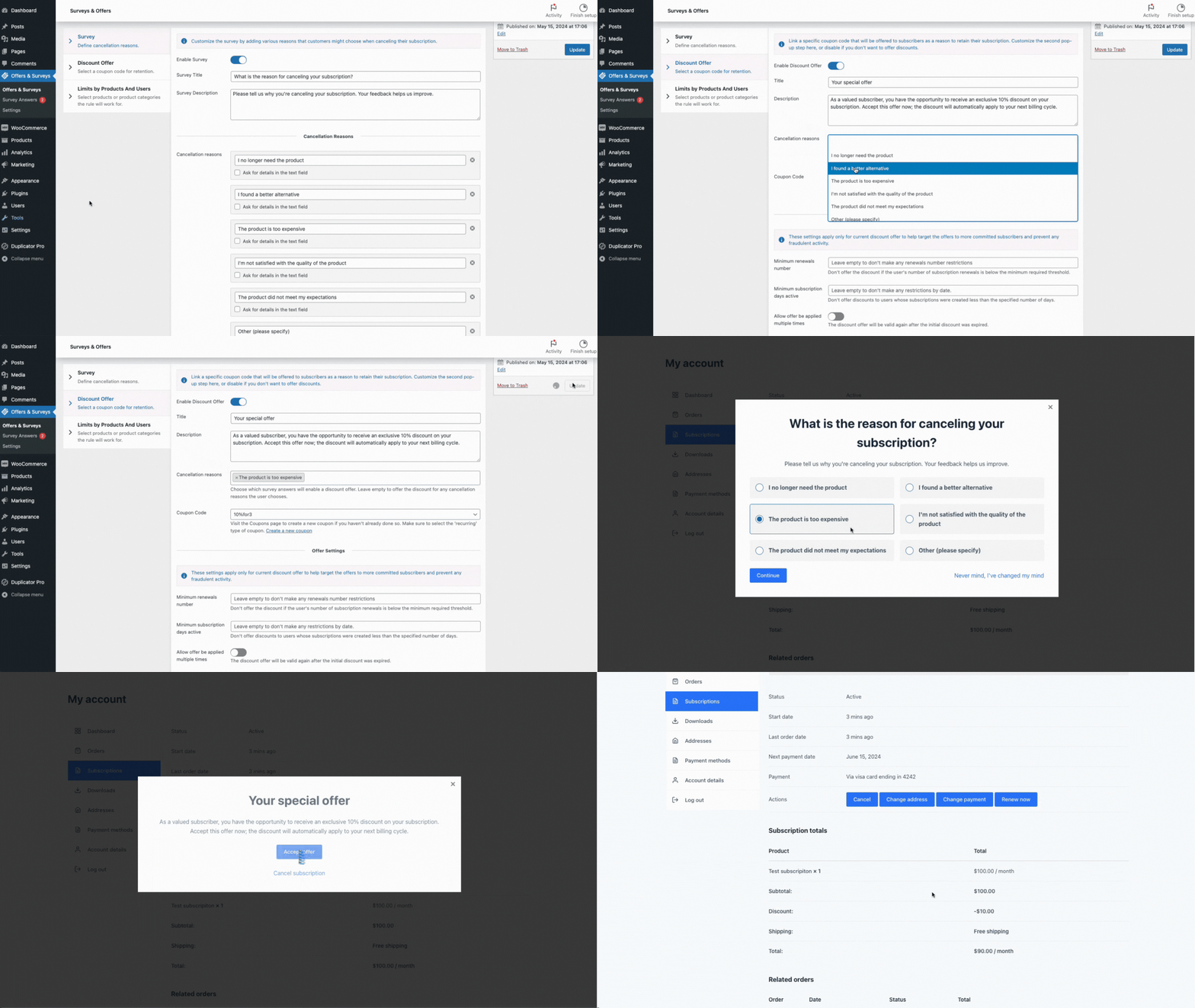
Cancellation Survey and Offers for WooCommerce Subscriptions 
Create survey step 1 
Add cancellation reasons for survey 
Retention offer to skip the next renewal 
Set subscription requirements for discount offer 
Select products and user roles for the current survey and offer 
Create several offers and surveys for different products and users 
Find survey answers and offers status in the dashboard 
Survey popup when user tries to cancel subscription 
Coupon code applied on user subscription in user account 
Regular WooCommerce coupon setup for subscription 

Installation
- Upload the plugin files to the /wp-content/plugins/cancellation-surveys-offers-woocommerce-subscriptions directory, or install the plugin through the WordPress plugins screen directly.
- Activate the plugin through the ‘Plugins’ screen in WordPress.
- Go to Offers & Surveys tab > Add Cancellation Offer > Create your Survey and define your multiple retention offers.
- After setting up > Make test purchase of subscription > Go to account – subscription and try canceling to see the logic in action.
FAQ
-
Can I have different offers for different survey answers?
-
Yes! You can create multiple offers within the same survey. This allows you to tailor your incentive—for example, offering a bigger discount to someone who says the price is too high, or a “skip renewal” option to someone who says they are just too busy this month.
-
What types of discounts can I offer?
-
The discounts are controlled by default WooCommerce coupon codes. You can link any coupon to your offer as long as it’s ‘recurring’ type of coupon, including fixed amount, percentage-based.
-
What is “offer to skip next renewal”?
-
There are two types of retention offers: a discount or a skip next renewal option. If you choose skip next renewal and the user accepts this offer, their next renewal date will be postponed by one subscription period.
-
Are there limitations on how many offers a user can accept?
-
You can choose to limit users to accepting only one offer, or allow unlimited offers so they receive a discount, or re-schedule renewal date, each time they attempt to cancel their subscription.
-
Is there a way to prevent abuse of the retention offers?
-
Yes, you can set limits on users who can accept offers based on subscription age, renewal counts, or trial status. You can also limit users to receiving a discount offer only once.
Reviews
There are no reviews for this plugin.
Contributors & Developers
“Cancellation Survey and Offers for Woo Subscriptions” is open source software. The following people have contributed to this plugin.
Contributors

Translate “Cancellation Survey and Offers for Woo Subscriptions” into your language.
Interested in development?
Browse the code, check out the SVN repository, or subscribe to the development log by RSS.
Changelog
2024-03-18 – version 2.0.0
* New: Multi-offer support! Create multiple different offers within a single survey.
* New: Conditional logic to trigger specific offers based on the user’s survey answer.
* Update: Enhanced dashboard to track performance of multiple offers per survey.
* Update: Freemius SDK updated.
* Update: WooCommerce & WordPress compatibility updates.
2026-01-08 – version 1.3.0
* New: Dynamic “Minimum characters required” for details field based on the selected cancellation reason.
* Fix: Load coupons by AJAX to prevent issues when there are many coupons.
* Fix: PHP 8.x compatibility issues.
* Update: Freemius SDK update.
2024-11-01 – version 1.2.0
* New: Retention rate analytics
* New: Advanced description editor
* New: Top survey answers analytics
* New: Filters for survey answers
* New: Skip the next renewal type of offer
* New: Duplicating surveys & offers
* New: Don’t make offers on trial period
* New: Select specific variation in product limitations
2024-07-22 – version 1.0.0
* Initial release